
Notification fatigue: saving nudge or delete button?
YNAB sent the most actionable alerts; Rocket Money created the most fatigue. In a 21-day test of 252 notifications from five apps, 55% of YNAB alerts led to a money action within an hour. Only 18% of Rocket Money alerts did, and two of three testers muted it before the study ended.
From June 22 through July 12, 2026, three editors used fresh notification settings for YNAB, Copilot Money, Monarch Money, Rocket Money, and PocketGuard. We captured every push alert and linked email, then coded what happened within one hour: acted, opened without acting, dismissed, or disabled. The accounts contained ordinary bills, a savings goal, variable grocery spending, and two deliberately low category balances.
“Acted” required a financial task: approving or correcting a transaction, moving budget money, checking a suspected charge, adjusting a goal, or transferring planned savings. Merely opening an app did not qualify. This distinction matters because notification teams often report click-through, while readers care whether interruption improved a decision.
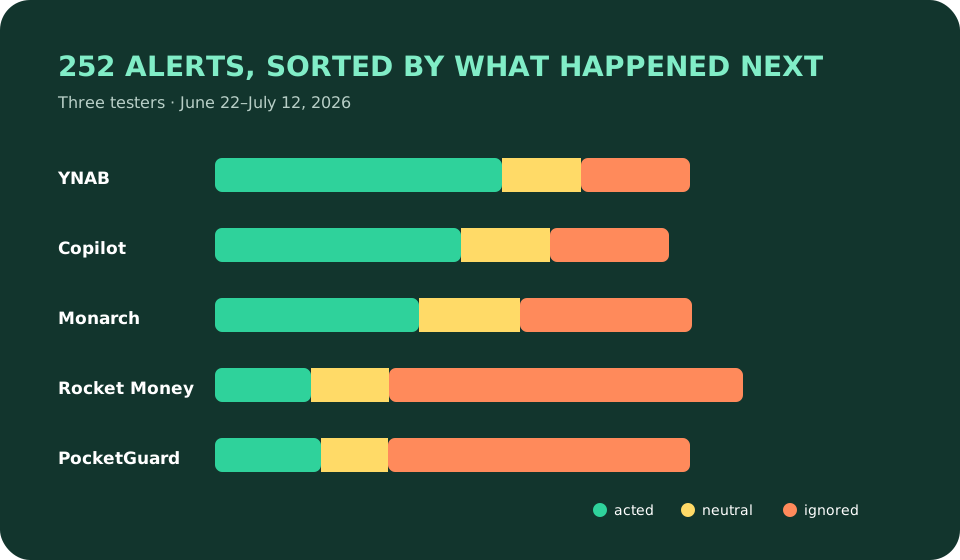
| App | Alerts | Acted | Opened only | Ignored | Action rate |
|---|---|---|---|---|---|
| YNAB | 44 | 24 | 7 | 13 | 55% |
| Copilot Money | 43 | 21 | 8 | 14 | 49% |
| Monarch Money | 48 | 18 | 9 | 21 | 38% |
| PocketGuard | 53 | 14 | 8 | 31 | 26% |
| Rocket Money | 64 | 12 | 9 | 43 | 18% |
The alerts that earned attention
Actionable alerts shared three properties: they named a changed state, gave an amount or deadline, and opened at the relevant decision. “Dining has $28 left through July 12” worked. “Stay on top of your spending” did not. Threshold messages generated a 63% action rate, unusual-transaction messages 61%, and account-connection failures 58%.
YNAB benefited from a model built around active allocation. Its strongest alerts pointed to overspent categories and targets that had become underfunded after a change. Users knew what “fix” meant inside that system. Copilot’s transaction-review prompts were similarly concrete and opened directly into a bounded queue. Its lower volume made each interruption feel more credible.
Connection warnings were the rare alert type that testers welcomed even when frequent. Stale data can make every chart wrong, so a precise reconnection notice protects the product’s basic truth. Our two-week app trial recommends deliberately watching for sync status before trusting any “safe to spend” number.
The fourth weak alert changed behavior
Fatigue did not rise smoothly. After receiving four non-urgent alerts within a rolling seven-day period, testers ignored 72% of the next non-urgent alerts, compared with 41% beforehand. The fifth generic insight was not merely ineffective; it trained people not to inspect later messages. One PocketGuard threshold warning was dismissed during that pattern even though it contained useful information.
Rocket Money generated 64 alerts, the highest total. Subscription discoveries were valuable early, but savings claims, feature prompts, credit messaging, and repeated summaries competed with those discoveries. Two testers disabled pushes on days 13 and 17. The third kept only transaction alerts after changing settings. This is the deletion side of the title: no tester deleted their account, but all three removed some channel of access.
Monarch sat in the middle. Its bill and account alerts performed well; general summaries did not. The product’s household model also created a coordination question: both people can receive the same financial prompt. Duplicate household alerts turned one task into two interruptions unless settings were divided. That friction matches the busier daily loop noted in our Monarch Money review.
Saving nudges need causal humility
We do not call every transfer after an alert “savings caused by the app.” Twelve of 95 actions were savings transfers totaling $684, but eight were already scheduled intentions. The notification improved timing or follow-through; it did not invent the goal. Apps should distinguish money moved from money newly saved, especially when reporting value back to users.
Generic celebration was also weaker than designers often assume. Seven “great job” messages led to one app open and no financial changes. Celebration can support habit, but it should not impersonate an urgent status. A weekly review summary performed better because it bundled progress with exceptions that needed attention.
A notification diet that survived the test
By July 12, our preferred settings were narrow: unusual transactions, stale connections, upcoming cash-flow shortfalls, selected category thresholds, and one weekly review. We disabled product announcements, generalized spending insights, credit promotions, and duplicate email copies. The surviving set averaged 2.8 alerts per app per week.
Readers should tune notifications after seven days, not accept the defaults indefinitely. Keep any alert that protects data accuracy or names a time-sensitive decision. Mute the rest, then see whether the app still earns a place through its interface. The broader dark-pattern field log explains when default-on attention moves from enthusiastic product design into manipulation.
Notification fatigue FAQ
Which budgeting app sent the most useful notifications?
YNAB produced the highest action rate in our June–July 2026 test: 55% of its alerts led to a budget review, category move, or planned saving action within one hour.
How many budgeting app notifications are too many?
Our testers became materially more likely to ignore alerts after the fourth non-urgent message in seven days. Relevance mattered more than a universal count, but three purposeful weekly alerts was a comfortable ceiling in this study.
Should I disable budgeting app notifications?
Keep alerts for stale connections, unusual transactions, upcoming shortfalls, and chosen budget thresholds. Disable promotional summaries, generic encouragement, and duplicate reminders that do not name a decision you can take.