
The 3-tap rule: can this app answer in time?
Copilot Money gives the fastest trustworthy answer to “can I afford this?”—two taps and a seven-second median. PocketGuard is faster at one tap and four seconds, but its headline number hides more assumptions. Every app except Simplifi reached relevant evidence within our three-tap limit across 75 timed runs in July 2026.
The question came from a store aisle, not a product roadmap. On July 14, one tester wanted to know whether a $180 home repair purchase fit without weakening upcoming bills or a travel goal. A balance could answer in one glance and still be wrong for that job. We turned the moment into a repeatable retrieval test.
From July 15 through July 17, 2026, three editors ran the task five times in Copilot Money, Monarch Money, YNAB, Quicken Simplifi, and PocketGuard: 75 runs total. Each app used the same checking balance, credit-card activity, $1,420 in scheduled bills, a $600 savings target, and a deliberately tight home-maintenance category. Account data was refreshed before timing.
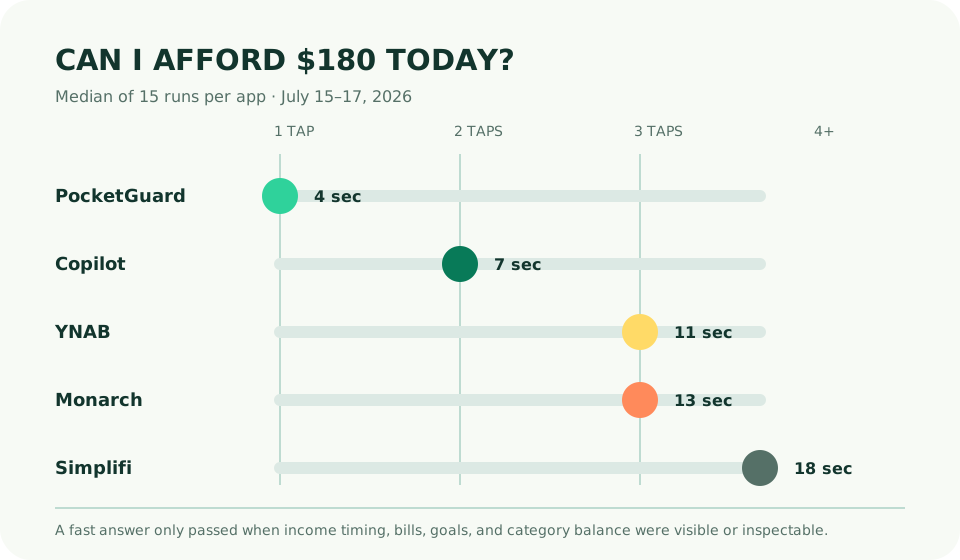
| App | Median taps | Median time | Answer shown | Verified? |
|---|---|---|---|---|
| PocketGuard | 1 | 4 sec | In My Pocket | After 3 more taps |
| Copilot Money | 2 | 7 sec | Category + cash flow | Yes |
| YNAB | 3 | 11 sec | Available category amount | Yes |
| Monarch Money | 3 | 13 sec | Plan remainder | Yes |
| Quicken Simplifi | 4 | 18 sec | Spending Plan remainder | Yes |
The rule: relevant evidence in three taps
The three-tap rule does not claim that every task belongs three taps from home. It says a frequent, time-sensitive question should reach the evidence for a decision within three intentional actions. Scrolling does not count as a tap; unlocking and opening the app occur before timing. A wrong turn counts. A home-screen number passes only if its inputs and period can be inspected without a scavenger hunt.
We judged the $180 purchase affordable only when the app showed that current money covered scheduled bills, the savings target, and the relevant category. The answer in our fixture was “not from this category today.” Moving $180 from the travel goal would make it mechanically possible, but that is a priority change, not discovered affordability.
Run 1: PocketGuard wins the glance
PocketGuard placed its In My Pocket number on the first useful view. All testers found it in four seconds. That number already accounts for detected income, bills, goals, and spending, which makes it more relevant than a checking balance. In a grocery aisle, the speed is genuinely useful.
Verification took longer. Testers needed three additional taps to confirm that a recently changed utility bill and the home-maintenance allocation were reflected. One stale bill would have changed the result by $96. PocketGuard therefore wins “what does the model currently say?” but not “can I quickly prove the model has the right inputs?” Its 4.0 position in our budgeting-app ranking reflects that same tension.
Run 2: Copilot keeps the answer and evidence close
Copilot opened on the transaction review, so the first tap moved to spending and the second to home maintenance. Median time was seven seconds. The category showed $74 remaining, while the cash-flow view made the scheduled-bill context one nearby gesture away. Testers reached the same “not today” answer in all 15 runs.
The interface did not declare affordability. It made the shortfall legible. That restraint is good design: a tool can expose constraints without pretending to know whether a repair is urgent enough to override travel. The patterns behind this speed are examined in our Copilot design-system case study.
Run 3: YNAB answers the category question
YNAB reached the home-maintenance category in three taps and 11 seconds. Its answer was the most philosophically precise: $74 was assigned and available, so a $180 purchase required moving money from another job. Testers could inspect the tradeoff directly. The method makes the decision explicit rather than calculating a general spendable pool.
The weakness is setup dependence. If the user has not assigned scheduled bills and savings correctly, the category looks authoritative without being complete. YNAB’s interface passes; the underlying habit does the heavy lifting.
Run 4: Monarch provides context at the edge
Monarch also passed at three taps, with a 13-second median. Its plan showed the category shortfall and made the broader flex amount visible. The information was complete, but more controls competed around it: plan groups, remaining totals, period choices, and rollover state. Two first runs paused to confirm which remainder governed the purchase.
That two-second interpretation gap is small in isolation and large when repeated. Monarch remains the better choice for shared planning, where both people need the same detailed model. Our household test found that breadth worth the slower loop.
Run 5: Simplifi needs one tap too many
Simplifi required four taps and 18 seconds to connect its Spending Plan remainder to the specific category watchlist. The app held the necessary evidence, but split it between planning concepts. All testers eventually produced the right answer. The failure is retrieval architecture, not calculation.
What the diary changed
On July 18, the original tester bought the repair item after deliberately reducing the travel target by $106. That final choice did not prove Copilot “found” money. It showed the value of a fast, inspectable constraint: the app made the tradeoff visible while there was still time to choose.
Run this test during a free trial with a real, non-urgent purchase. If the app shows one number, inspect its bills, dates, data freshness, and goals. If you cannot explain the answer by tap three, the dashboard is reporting rather than deciding. Our selection guide includes the other trial tasks that should follow.
Three-tap rule FAQ
Which budgeting app answers “can I afford this?” fastest?
PocketGuard showed its spendable number in one tap and four seconds, but Copilot produced the fastest answer that our testers could verify, taking a median two taps and seven seconds.
What is the three-tap rule?
A budgeting app should reach a relevant, inspectable affordability answer within three intentional taps from its home screen. The rule measures retrieval speed, not whether an app should make a purchase decision for you.
Can a budgeting app tell me what I can afford?
It can summarize current inputs, but the answer is only as reliable as account freshness, bill timing, category rules, and goals. Treat the number as decision support and inspect its assumptions before a consequential purchase.